Your secrets, invisible to everyone but you.
Obskura protects passwords and files with military-grade encryption. No account, no subscription, no third-party service: your data stays where you decide — on your computer, on a USB stick, in your cloud or on your own server.
Everything you need, nothing that spies on you
Obskura combines in one app a password manager modelled on KeePass and file vaults modelled on Cryptomator, with sync and backup that work with the services you already use.
Password databases
Groups, custom fields, attachments, change history, expiry dates, favourites and a strong password generator. A single .obk file that you store wherever you like.
File vaults
An encrypted folder in the style of Cryptomator: drag documents and photos in, and names and contents become unreadable. Each file is encrypted separately — perfect with Dropbox, OneDrive and iCloud.
On your own servers
Open and save databases and vaults over SFTP, FTP/FTPS, WebDAV (Nextcloud, Synology, QNAP…) and SMB. No imposed cloud: you decide where your data lives.
Multiple devices in real time
The same database open on several computers: changes are merged entry by entry and reach the others within seconds.
Each device, its own paths
Every computer has a unique identifier and saves its own paths to the database, key file and backup in the encrypted file next to the database. Mac, Windows and Linux open the same database even when they reach it through different paths.
Automatic backup
On every change an encrypted copy goes to a second destination, local or remote, with dated versions and a copy of the key file. Each device can have its own.
Import from your old manager
Direct sign-in to Bitwarden, LastPass, 1Password, Proton Pass, Dashlane and Keeper: no files exported in clear text. Plus CSV from KeePass, Chrome, Firefox.
Find everything, from any computer
An Obskura access key encrypts, next to each database, where the key file, backups and servers are. Select the database and the app finds the rest by itself.
8 languages, and more on demand
Italian, English, German, Spanish, Russian, Chinese, Japanese and Arabic, picked automatically from the system language. More languages can be added by importing an XML file.
No paths on display
No paths or file names appear in the interface: anyone looking at the screen only sees the names you chose.
Automatic lock
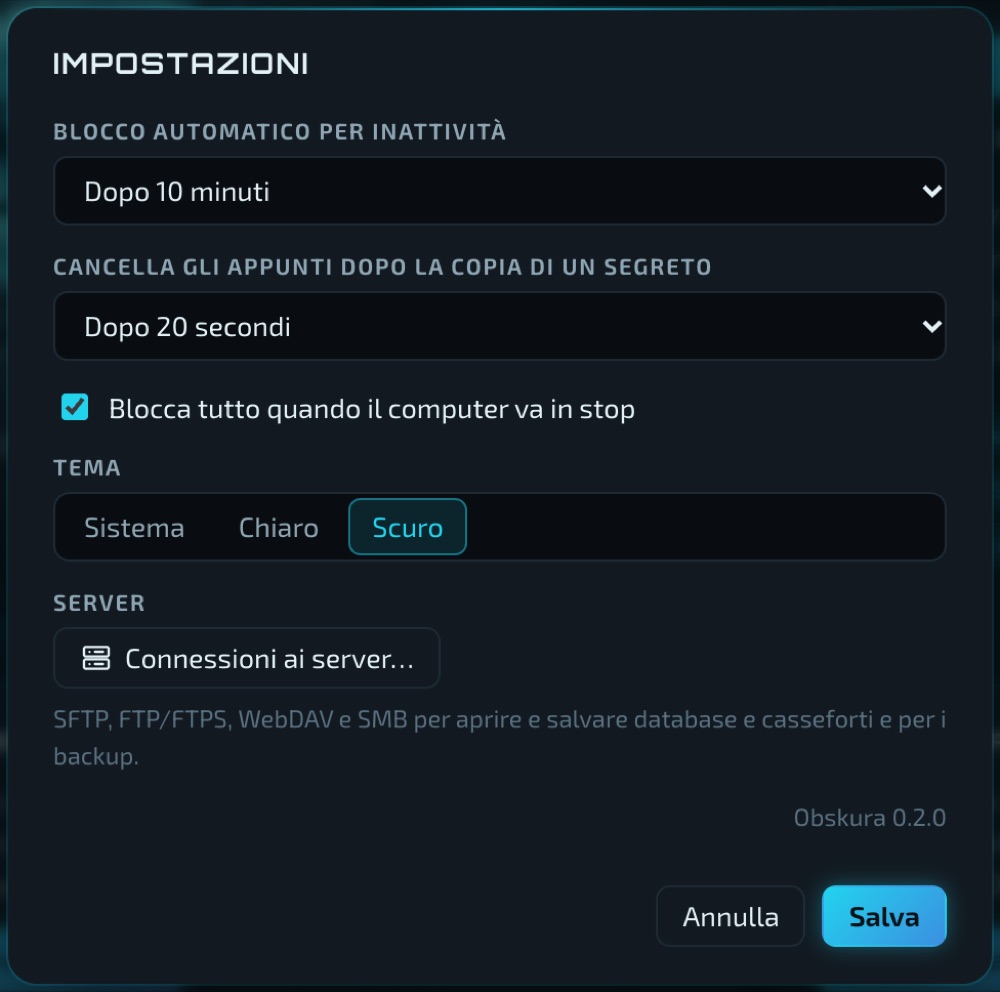
It locks after a period of inactivity and when the computer goes to sleep. The clipboard clears itself after a password is copied.
Tidy, fast, always at hand
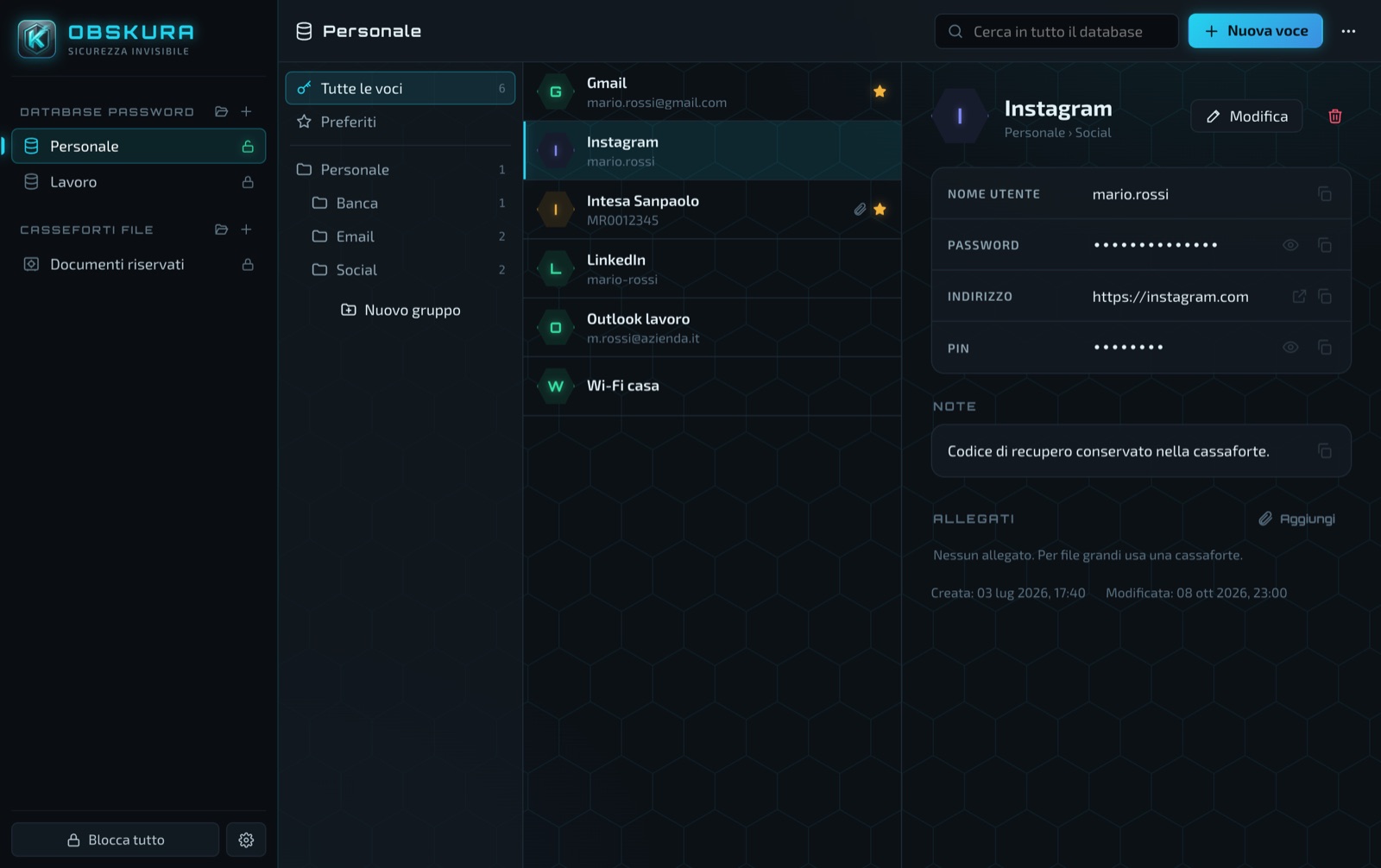
- Instant search across titles, users, addresses, notes and tags.
- Safe copy: passwords and codes go to the clipboard and vanish after a few seconds.
- Generator for passwords and passphrases, with a strength estimate.
- History for every entry, to recover a password changed by mistake.
- Opens with a password, a key file or both, like KeePass.
Documents safe even in the cloud
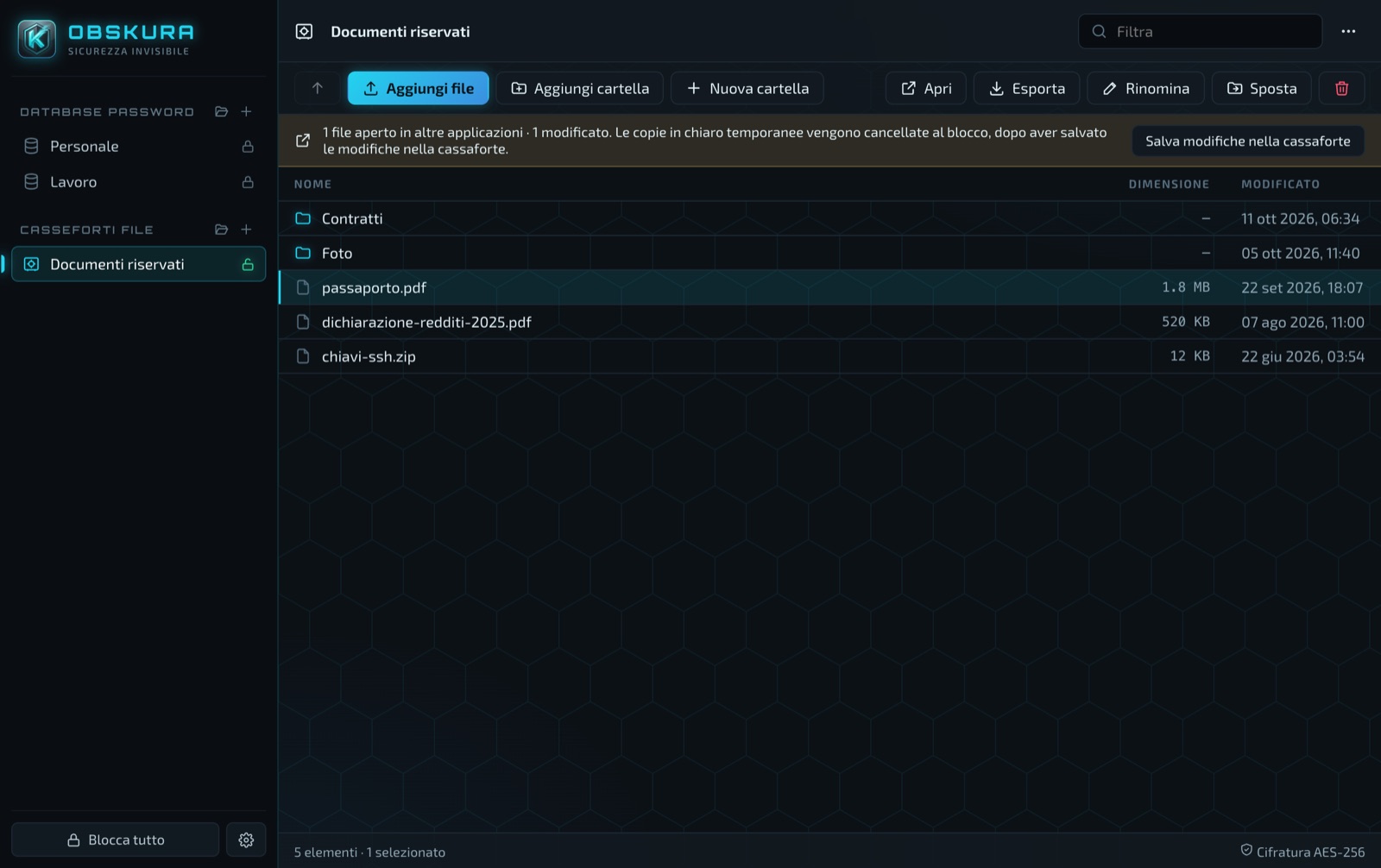
- Drag in files and folders: Obskura encrypts contents and names.
- Open a file with its own program and, when you save it, it goes back encrypted by itself.
- Every file is independent: efficient sync with Dropbox, OneDrive, Google Drive, iCloud.
- Also works on NAS and servers over SFTP, WebDAV and SMB.
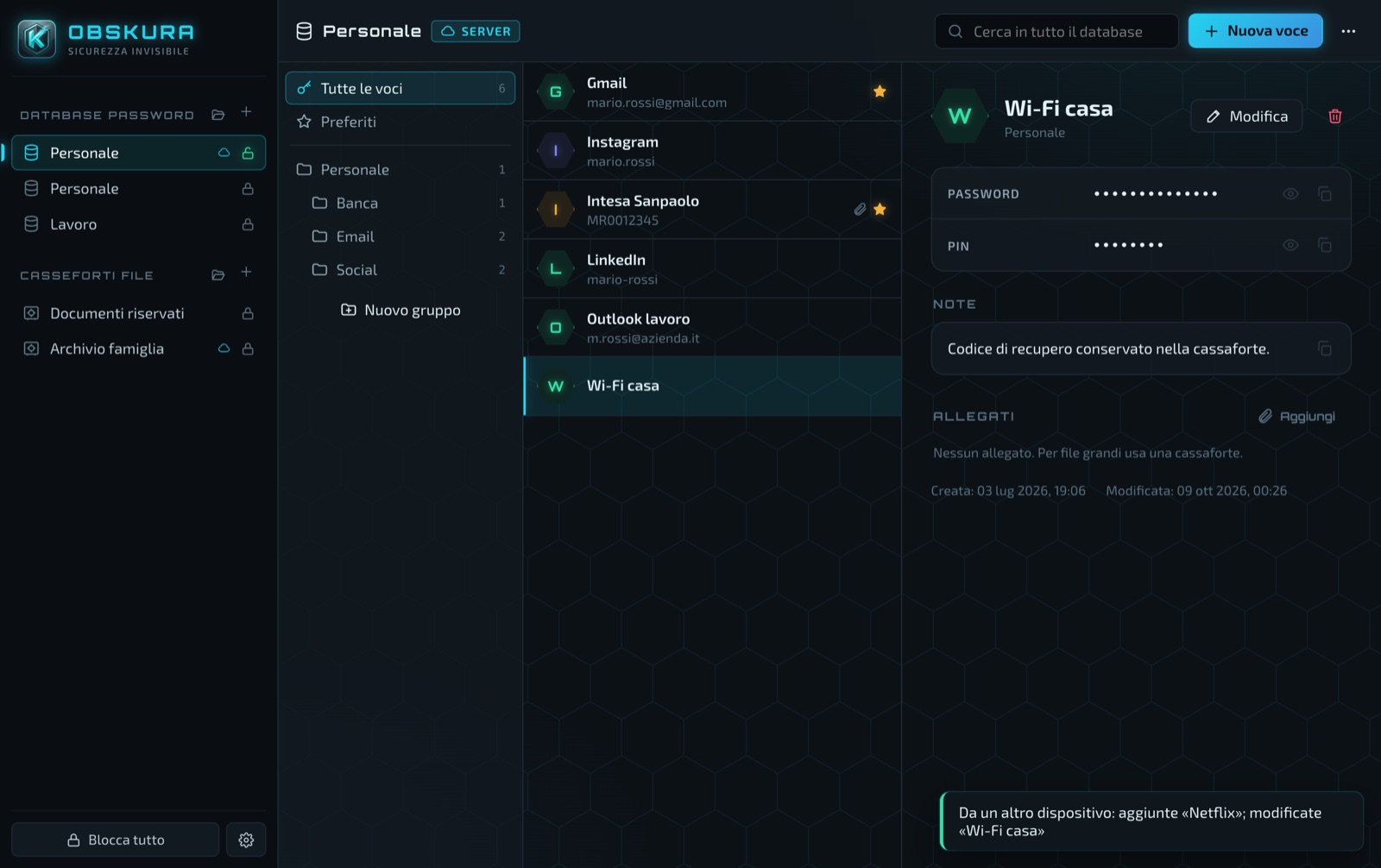
Work on several computers, without conflicts
- The same database open on several computers at the same time.
- Changes are merged entry by entry: the most recent wins, the other stays in the history.
- Each device has a unique identifier and remembers its own paths to the database, key file and backup, in an encrypted file.
- The “Devices and paths” window shows who uses the database, from where and when.
Encryption without compromise
Standard algorithms, strong parameters and no shortcuts. Plain-text data stays only in memory and is wiped on close. The source code is public: anyone can check it.
| What | How |
|---|---|
| Key derivation | Argon2id: 256 MiB / 3 passes (standard), 1 GiB (high) or 2 GiB (extreme): makes brute-force attacks useless |
| Encryption | AES-256-GCM, XChaCha20-Poly1305, Serpent, Twofish, Camellia, or cascades of several ciphers with independent keys |
| Integrity | The whole file is authenticated: any tampering, even with the parameters, prevents opening |
| File names | AES-SIV, bound to the folder that contains them |
| Composite key | Password and key file combined as in KeePass KDBX4 |
| Device paths | Saved with each device's identifier in a file encrypted with the Obskura access key (AES-256-GCM) |
| Privacy | No account, no telemetry: the app only connects to the servers you configure |
It speaks your language
Obskura opens in your system language; if it is not one of those included, it uses English. You can change it at any time in Settings.
- 8 languages included: Italian, English, German, Spanish, Russian, Chinese (Simplified), Japanese and Arabic (right to left).
- Open translations: all the app's texts are in one XML file per language. Export the template from Settings → Language, translate the texts and import the file: the new language appears immediately.
- Corrections work the same way: an XML file with just a few entries fixes only those texts.
Download all XML files zip · the 8 languages, to use as a base for a new translation · 147 KB
Switch managers in two minutes
Sign in to your old service directly from Obskura: the vault is downloaded and decrypted on your computer, without creating files exported in clear text. Folders, custom fields, TOTP codes, cards and notes are preserved.
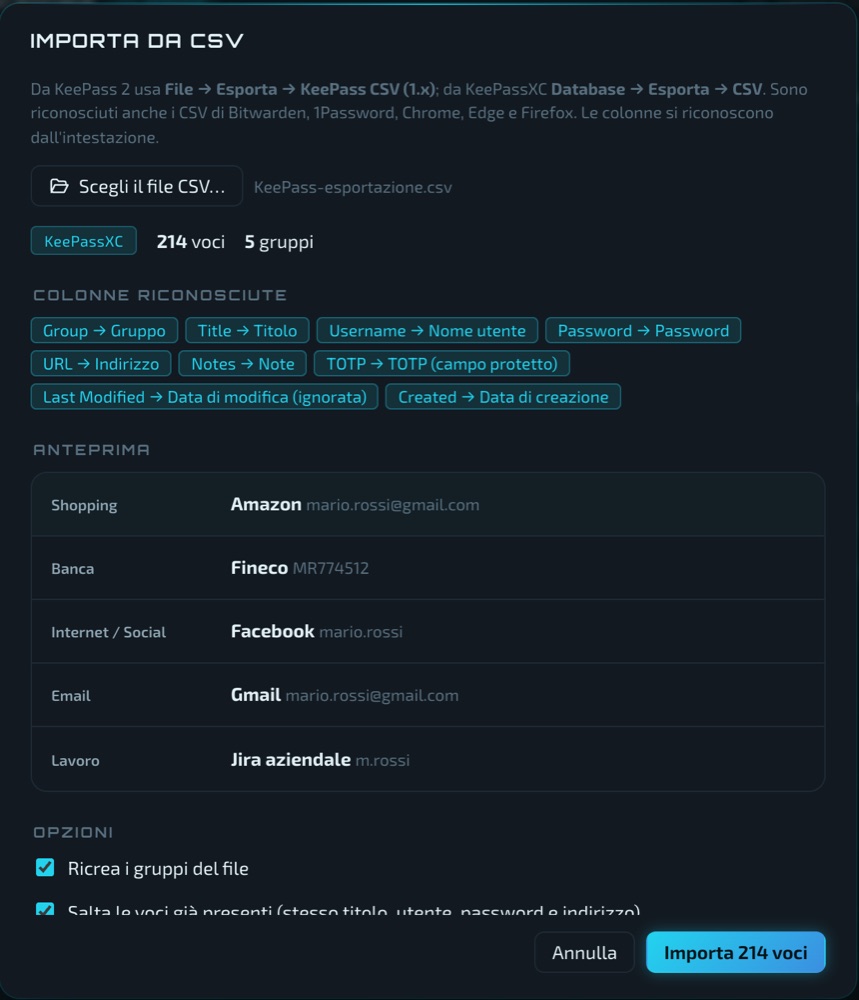
Also from CSV files: KeePass, KeePassXC, Chrome, Edge, Firefox and others. 1Password, Proton Pass, Dashlane and Keeper require the service's official command-line tool.
Download Obskura 0.3.0
Free, no registration, in 8 languages. We highlighted the version for your system.
Windows
Your systemWindows 10 and 11, 64-bit. The installer uses the Windows language.
Total downloads: –
macOS
Your systemmacOS 11 or later, Apple Silicon processors (M1 and later).
Total downloads: –
Linux
Your system64-bit (x86_64). Ubuntu 22.04+, Debian 12+, Fedora and derivatives.
Total downloads: –
chmod +x Obskura_*.AppImage).To check that a downloaded file is intact and genuine, compare its fingerprint with the SHA-256 list: shasum -a 256 filename on macOS and Linux, certutil -hashfile filename SHA256 on Windows.
User manual
The complete manual in PDF, covering every feature: databases, vaults, servers, backup, devices and paths, languages and import.
Translate Obskura
The empty XML template contains every text of the app to translate, each with the English reference text next to it. Fill it in, try it by importing it into Obskura and send it to us as an attachment from the Contact page. Chapter 14 of the manual explains every step.
How to use Obskura to keep passwords and files safe: on your own NAS, encrypted in the cloud, or coming from another password manager.
A password manager on your own NAS, no cloud
How to keep your passwords on your Synology, QNAP or TrueNAS NAS with Obskura: encrypted on your computer, stored over SFTP or WebDAV, synced in real time across computers. Free, no account.
Read the guide →Switch to Obskura from Bitwarden, 1Password, LastPass and others
How to import your passwords into Obskura directly from Bitwarden, LastPass, 1Password, Proton Pass, Dashlane and Keeper with no plain-text files, or from CSV files from KeePass, KeePassXC, Chrome, Edge and Firefox.
Read the guide →Obskura or KeePassXC? Differences and which to choose
An honest comparison of Obskura and KeePassXC, two free password managers: file format, sync, servers, ciphers, file vaults, browser and smartphone.
Read the guide →Encrypt your files on Dropbox, OneDrive, iCloud and Google Drive
How to encrypt documents and photos before they reach the cloud with Obskura vaults: each file encrypted separately, names and folders hidden, normal syncing. Free, a Cryptomator alternative.
Read the guide →Questions
Is Obskura really free?
Yes, for everyone and for any use, including work: no subscriptions, paid editions or ads. The source code is public for anyone who wants to verify it (PolyForm Strict license): you can read and build it, but not modify or redistribute it.
Where do my passwords end up?
Only where you save them: a file on your computer, on a USB stick, in a synced folder or on your server. Obskura has no servers of its own and collects no data.
What happens if I forget the master password?
Nobody, not even us, can recover it: that is the price of real encryption. Use a long phrase you remember and keep a copy of the key file and of the Obskura access key in a safe place.
What is the Obskura access key?
A code generated on first launch that encrypts the information saved next to each database (where the key file, backups and servers are, and the paths of each device). On another computer you enter it once and Obskura finds everything by itself. It does not replace the database password.
Can I use it on several computers together?
Yes. Put the database in a synced folder or on a server: each computer's changes are merged automatically and reach the others within seconds. Each computer remembers its own paths, even if the folder has a different name on Mac, Windows and Linux.
Which language does the app open in?
In your system language, if it is Italian, English, German, Spanish, Russian, Chinese, Japanese or Arabic; otherwise in English. In Settings → Language you can choose another one or import a new one from an XML file.
How do I import passwords from Bitwarden, 1Password or LastPass?
Open a database, menu ⋯ → “Import from an online manager”, choose the service and sign in. The data is decrypted on your computer and added to the database, with no intermediate files.
Is there a smartphone app?
Not yet: Obskura is available for Windows, macOS and Linux.